Showing posts with label new apps google. Show all posts

New Android App For Getting All Your News


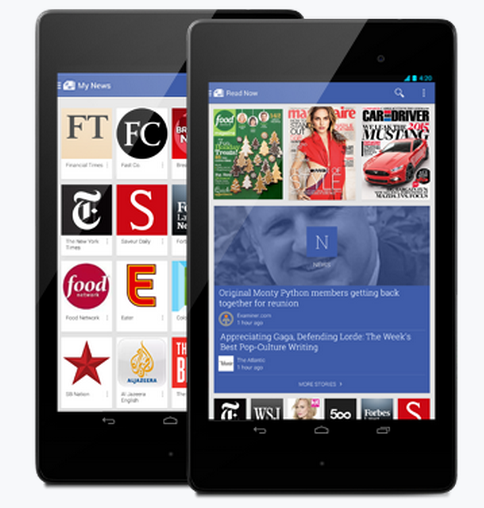
Google recently introduces an Android Application Google Play Newsstand for Getting all your News and Magazines in one Click. You can explore the topics that you are interested which is published in Newspapers. Bookmark feature is available for making it easier to read after sometime. It also works Offline too. Both free and Paid Subscriptions are allowed for various Magazines. By Google Play Newsstand App you can subscribe to News Blogs,News Websites and HD Magazines. If you are Google Current subscriber all you subscriptions are transferred to Google Play Newsstand.

Also see

Use Your Gmail Offline - Its Free

List Of Useful Google Offline Apps

Check your Internet Problems With Chrome Connectivity Diagnostics

Chrome Connectivity Diagnostics is a Google Chrome app which is used to know the problems in internet connections setting and issues in your computer. It is simple application to use through Google chrome. It also checks connectivity for all the Google Services which is used by you. It can easily installed by visiting the Chrome Web store. To Visit the Chrome Web Store for Chrome Connectivity Diagnostics Click the image below.
After installing the application Click the Chrome Connectivity Diagnostics app, It will run the test for a few seconds and gives the result. The result will show the problems and issues related to your computer and internet connections so that you can be able to detect and Correct it.

List Of Useful Google Offline Apps

Google Provides some of the very useful Applications which runs on chrome offline. Here is the list and its uses. To visit the Chrome web store for these click the image

Gmail Offline


Gmail offline enables you to  use your Gmail without internet. To know more about Gmail offline and the procedure to enable Click Here. Follow the same procedure for enabling all the Google apps.

Google Drive
Google gives every user of  about 15 GB of storage, so users can store their files in Google Drive and it can access anywhere over the internet. Folders can also be created in it and various types file are also allowed to stored in it.

Google Docs
Google Docs is an very effective application to edit documents in both on-line and offline. While using Google docs on-line the document will be auto saved for every moment in Google Drive so you can edit your files anywhere in the internet.

Goolge Calender
Google Calender is an essential applications for who Schedule their activities. It has many feature such as Phone remainder, SMS remainder, email remainder and it can also be synchronised to your phone too. It works as read only version in offline.

Google Slides
It is good tool for creating presentations instantly anywhere and sharing. It is also accessed with Google drive and stored through it.


Use Your Gmail Offline - Its Free

Google Introduces Some of its products to work in offline through Chrome. Gmail Offline is a Google app that allows you to use your Gmail Account Offline. This App is free to use and it is very easy and reduces the data usage for loading the Gmail every time. This App will synchronise the Gmail account automatically every time when the chrome is runs with an Internet Connection.

To activate Gmail Offline App for your Google Chrome web browser, click the image


A webpage will appear as shown below.


Click the Free button at the top of the right side then chrome will ask the confirmation to add the App, Click Add. Now the Free button changes into Launch App so that you can be able to launch the application for use.

If you want use Gmail offline after the app is added to chrome, Go to Google Chrome and open a new tab and click the (Show apps) button to show the list Chrome apps and click the Gmail Offline app.


New way to find Apps in Google

Google always Introduces new features in using it's apps and other products for making the user to feel friendly as much as possible. This time Google changes its app selection method. Generally the Google products such as G plus,Search,Images,Maps,Play,YouTube,News,G mail,Drive,Calender and More are present at the top of the Google page as tabs but now the this tab is removed. Instead of that a new Apps button is introduced at the top right corner of the page show below.


To select a app, Click the Apps button, now a list of Google app will be displayed.
If your required app is not in this list, click more to view other apps, now some of the other apps will be displayed

If you want to see all the products from click Even more from Google.